Drool on the Frog

Monday, December 01, 2008

MoPo: Kyle Webster


This week I want to introduce you to local artist and illustrator, Kyle Webster.

I remember meeting Kyle when he worked for Shapiro Walker. The company I worked for at the time was looking for a design firm to revamp our company web site. I recognized his work from city event banners hanging downtown. Kyle talked to me about digital art and you could tell he just loved to draw. He was even thoughtful enough to connect me with a life drawing group that was meeting in a sister city.

Since then, Kyle has made the full transition from working for someone to being a successful freelance artist. His work has appeared in Paste, The Stranger, and The New Yorker and, most recently, The New York Times, The Guardian, and The Wall Street Journal. Congratulations, Kyle.

The distinctive feature of Kyle's work is line. While I admire and marvel at work that is about color because it's not what I do well, I love line because I connect with it. And what he does with line - wonderful.

His web site features blog postings about his work as well as his portfolio. In addition, as if he weren't busy enough, check out The Daily Figure blog and his first issue of the Light Children comic book.

Labels: ,

MoPo: Brian Dettmer


Brian Dettmer takes altering books to, well, an art form by actually carving into the books to reveal the art inside. It's really amazing and you just have to see it.

Per his wiki, Dettmer takes media whose content has ceased to be relevant and looks at turning it into new, relevant content.

This is such a beautiful idea because I love books. Although I do a lot of reading on-line, I can't ever imagine living somewhere without a library or physical books. Although MyGeek thinks altering a book is sacrilege, this technique of Dettmer's puts books in the category of beauty that I see them.

Labels: , ,

Monday, November 24, 2008

MoPo: Jen Stark


I love paper. A disturbing thrill comes over me whenever I enter an office supply store. Even as a kid I remember flipping through those marvelously blank pads of paper, any kind, and not understanding the uncontrollable desire to buy them all. I have the hardest time throwing away even the smallest scrap. Maybe this is why I'm drawn to the scuptures of American artist Jen Stark. She works with paper. Stacks and stacks of colored paper.


Her inspiration comes from scientific subjects (fractals, worm holes, anatomy) and her tool of choice? An x-acto knife. How wonderful. I love my x-acto knife. The sculptures are beautiful and scientific looking at the same time even though she does it all from sketches and by hand.

Stark was also featured in Wired magazine.

Labels: , ,

Monday, November 17, 2008

MoPo: Ferry Staverman

I was escending* through some blogs one day this week and ran across several artists I want to introduce you to.

Ferry Staverman is a Finish artist who does wonderful things with cardboard and string. Most of my research only turned up dozens of blogs pointing to his work and web site so I have very little info on the artist. If you happen to read Dutch, you'll enjoy more than the impressive portfolio.

Once again, I'm drawn to artists who use everyday, found materials to create amazing visual interest. It seems they see beauty in everything. The idea of keeping things simple and being creative with what exists is a personal goal so these types of artists are very inspiring.


*escend - The process of following a link from one web site and/or blog to another repeatedly. A form of electronic rabbit chasing. (ex. Sam escends for hours resulting in his cache of obscure trivia.)

Labels: , ,

Monday, September 15, 2008

MoPo: Coffee & Foam Art


Some might say that artists can be characterized by their addictions (caffeine, nicotine, or, um, others). But I never thought about making my addiction the art - two of my favorite things in the world. See what these creative individuals can do with the foam on the top of their cup of joe.

Enjoy!

I'm sorry, I don't remember where I found this original link. I like to give credit and also hook you up with other good resources, but all I recorded was this link.

Labels: ,

Wednesday, September 10, 2008

Project: Oil Tank 3.0

Project: Oil Tank 1.0
Project: Oil Tank 2.0
Project: Oil Tank 4.0

I was able to paint some yesterday but the rains started in the afternoon and they're predicted to continue through the week.

Color science is very complicated and I won't even pretend to know much about it. If I did know more, I might be more comfortable using color. I do know that the color you see on your computer screen or in a projected image is entirely different than color you get in paint or color pencils. I bring this up because my design was created on the computer. A computer monitor creates color using light. Color on paper is created by mixing ink pigment. That's why your printouts don't look like what you see on the computer monitor. These are two different color sciences.

Color palette for the front of the tank.

Color palette for the side of the tank.

Here are the "color swatches" for my design. Even these don't look totally accurate. That taupe color in the Front swatch (RGB 139, 104, 76) is really a red mauve and the black in the Side swatch (RGB 0,0,0) is kind of dark brown. Color is tricky.

The night I traced the areas for the red mauve color, I started out using a red based prisma color but, at night, I couldn't see my pencil marks so I couldn't tell where I was at. I quickly had to switch to a blue prisma pencil that I could see in the projection. When I started painting the yellow, the brush sometimes picked up the blue prisma color and blended into the yellow making green. This is something I thought might happen but, there's so little blue getting mixed in, I don't think it'll be a problem with a couple more coats of yellow.

I was also worried about the prisma colors creating a resist to the acrylic, sort of like trying to paint on waxed paper. There's been little trouble with this except for the yellow prisma color. It's interesting that the yellow pigment created more of a resist than white, blue or red.

The paint is going on kind of thin. Since the background is black, the paint is somewhat transparent, so, I'll need to put on two or more coats to get the colors opaque. My original plan was to completely finish all the white and then move on to the next lightest shade and completely finish it. This became kind of boring so then I switched to covering up all my trace lines with the appropriate color.

This turns out to serve second purpose. Getting my design traced using the paint will help preserve the design. I have it covered in plastic and I don't think the prisma colors will wash off easily but with seven days of rain I didn't want to take any chances. Even if the tank just ended up with splatters of dirt and mud, it would be impossible to get off without ruining the prisma color lines.

Tracing in all the colors also showed me how complicated my design is. Looking at a yellow line I'd know that either to the right or the left of that line is suppose to be painted yellow but the other side is suppose to be painted mauve. But which side? I'd have to trace the yellow line back or check the print out of my design to figure out which.

During the rainy days to come I'll probably read my backlog of library books (all due 9/22), write to my blog, and put together the curriculum for my PowerPoint and Word classes. I also need a new art project after this one!

The next step is to order the laquer sealer, mix the colors for the frog and then paint, paint, paint.

(As I write this I'm enjoying a cup of Iced Hazelnut coffee from McDonalds.)

Project: Oil Tank 1.0
Project: Oil Tank 2.0
Project: Oil Tank 4.0

At the end of week 3

MORE ON MIXING PAINT
I took the RGB values (the way color is formulated with light) from my computer design and tried to get a CMYK color (the way color is formulated with pigment) to match it as closely as possible (To do this I used this tool by Peter Forret). I thought the CMYK would help me with mixing the paint. For instance, the yellow color (CMYK 0, 0, 17, 0) has 0 Cyan (blue), 0 Magenta (red), 17 Yellow, and 0 blacK. Since the color is a tint of yellow I figured it was 17 parts yellow and 83 parts white. This theory worked o.k. with the first two color mixes but was way off when I mixed the red mauve (CMYK 49, 51, 78, 2). I did not need 49 parts blue! I ended up adding tons of red and some more yellow to get the shade right. Oh, well, it was an interesting experiment. I was just glad I got the colors mixed fairly easily in the end.

Some other helpful web sites regarding color charts and colors for web sites, try these:
HYPE'S Color Specifier
VisiBone's free color services (scroll to the bottom of their home page)

My model.

Labels: , ,

Monday, September 08, 2008

MoPo: Woodrow Wilson High Seniors


I love seeing art encouraged in kids - especially in the 9th-12th grade years. Studio arts are rare at the grade level. Probably budget cuts.

Anyway, check out the wonderfully creative art project at Woodrow Wilson High in Dallas. (MyGeek found the link from FrontBurner, a great Dallas area blog.) As a fundraiser, Seniors could pay to paint their parking spots. Lots of creative work. Although some of them look like they've maybe had graffiti experience before. Hmm.

At least the young are being raised on good quality rock music.

Labels: ,

Wednesday, September 03, 2008

Project: Oil Tank 2.0

Project: Oil Tank 1.0
Project: Oil Tank 3.0
Project: Oil Tank 4.0

Most of my crazy projects are done for two reasons: to do something fun and to learn by doing something totally new and experimental. There's been a lot to learn from my oil tank project.

This past week I got the entire design traced onto the tank and started painting.

First, I altered the colors in the design. When I tested the projection of the design against the tank, it was hard to distinguish the white areas from the pale yellow so I change white to blue.

It only took two nights to trace the design: one night to trace the end design and one night to trace the front design. Our friend, TJ, owns an A/V company and he generously gave me a long term loan of one of his projectors: a Panasonic PT-LC76U LCD. I had to do all the tracing after sunset and I only had one shot to get the design done. There was no way to do part of the dog's face and then come back and finish it on another night - it would be impossible to realign the projector exactly where it was the night before. The largest part of the design took me a little over two hours to trace. The very exciting 21 second video below is me tracing the end design and swatting away bugs attracted to the light.


I wasn't quite sure what type of pen or pencil was going to write effectively on the tank. It could be permanent as long as the acrylic paints would completely cover it. It couldn't be too sensitive because it would probably take me a couple of weeks to paint the whole design so it needed to hold up to the afternoon sun. I have the tank covered in plastic so hopefully it won't get wet. By accident, I discovered the most effective drawing tool was Prisma color pencils. (See below for more details on the pens I tested.)

Now that the design was on the tank, I could work in the day time when there were fewer bugs!

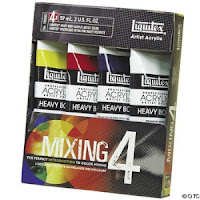
To save money I bought only white, red, yellow and blue acrylic paint (I already had black). Even though my design only has seven colors, at around $9 a tube, it was going to cost a lot so I'm going to see how difficult it's going to be to mix my own colors. Buying the four colors in a set was like getting one tube free.

I start by painting the lightest color first. The first day I painted I got most of the white finished.

Next I will need to mix the remaining paint colors and store in air tight containers.

Stay tuned for updates on this project.

(As I write this I'm enjoying a warm Duncan Hines Peanut Butter Cup Candy Shop Brownies and a side of Breyers All Natural Homemade Vanilla ice cream and a bottle of Le Bleu water.)

Project: Oil Tank 1.0
Project: Oil Tank 3.0
Project: Oil Tank 4.0

DESIGN IN CORELDRAW

I created the original design for Art Unleashed 2006. Here is what I remember, step-by-step, of that process from two years ago using the CorelDraw Graphics Suite software.
  1. Snap several pictures of your dog until I find the one you want to work with.

  2. Upload the pictures to your computer.

  3. Open a new document in CorelDraw.

  4. Select Import under the File menu and import the picture.

  5. Double click on the picture to open it in Corel PhotoPaint.

  6. First, I cut out the image of Willa (cutting out all the background) using the Cutout Lab under the Image menu. Cutout Lab works best if you are zoomed in tight on your image, especially if you're dealing with hair or any fine textures. I made my nib size at least 15 and then traced around Willa's head. (Click image to enlarge.)

  7. When finished tracing, click Ok. The Cutout Lab window will close and the traced image, minus the background, will appear.
  8. Fix any red eye, if you have any.

  9. Save the cutout and close Corel PhotoPaint. The cutout should now appear back in CorelDraw.

  10. Next I did a PowerTRACE. Right click on the image and select Trace Bitmap/Low Quality Image. There are several options to choose from here. You need to decide how much detail you want in the traced image and how many colors you want to use (I used 5). You just have to play with this.

  11. Don't forget to save your work.

PROJECTION ISSUES
  • The design is very complicated so I need to project it onto the side of the tank and trace it. My friend Erin asked me if I was going to use a tracer projector. I didn't even know these existed but, sure enough, you can buy a simplified projection system for enlarging and projecting. She said she got hers for about $30. I found some on DickBlick but you could also use the weekly A.C. Moore 40% off coupon to get one.

  • The initial color of the tank was gray. The background color of my design is black. What I had to test first was whether my design would project onto a black surface. When it comes to color and light, I know a lot less than color in print. While the tank was still gray, I projected my design outside onto a piece of black cardboard. The design showed up clear as a bell. This was great news because it meant that I could paint the black background before starting the design not after it was finished which would be much more tedious.

  • It would be even more impossible to trace part of the design then set up the projector the next night and line it up to what had already been done. Projection is way too sensitive for that (zoom, focus, tilt, horizontal level, etc.), not to mention positioning the image source in the exact same spot as well. Even while I was tracing the design, I noticed it would creep a little. How and why is still a mystery to me.

PENCIL TEST

I tested several writing implements to see which would:
  1. semi-permanent to permanent
  2. not be affected by heat
  3. not be easily rubbed off
  4. covered over easily with acrylic paint

Here's how the test went:
  • Sharpie Metallic, silver- Works great but the tip is too broad and there aren't enough colors.
  • Sharpie Poster Paint, white - Worked great but the only store where I knew they were sold has gone out of business.
  • DecoColor Opaque Paint Marker (extra fine tip), silver - Difficult to work with; expensive for this kind of use.
  • Conte Pastel pencil, white - Too delicate; easy to rub off.
  • Stabilo All, orange, yellow, green, red - More brittle than I expected. Worked better than anything else but I only had three colors.
The Winner - Prisma color pencils
Not too soft, lots of colors, and I can sharpen them to as fine a point as I want.


PAINT


This set comes with a color wheel poster with instructions on how to mix paints.

Labels: , ,

Monday, September 01, 2008

MoPo: Sam Winston

I love type! I've always been a font junky. Seeing letters as an art medium is just another way of proving I'm a geek.

Check out the 2-D type sculptures/collage of Sam Winston. For me, they are absolutely thrilling and exciting.

As my friend, the pharma rep says, "It makes me happy."

Labels: ,

Wednesday, August 27, 2008

Project: Oil Tank 1.0

Project: Oil Tank 2.0
Project: Oil Tank 3.0
Project: Oil Tank 40

You've heard the phrase "putting lipstick on a cow?" Well, that's kind of like my current project.

Last year when the nights were beginning to get really nippy, we scheduled to have our heating oil tank filled. When I got home that day I knew something was terribly wrong. The air outside wreaked of heating oil and inside the house was just as bad. It turns out that our oil tank was too old to handle the weight of 240 gallons of heating oil and sprung a tiny leak. This is the hard way to find out that your heating oil tank needs to be replaced.

The old tank was in our basement which caused the whole house to smell. The new tank is installed outside to avoid this kind of problem. After installation, we were informed that the tank had a primer on it but would need to be painted within a year to ensure longevity. Paint, you say? Sounds like a canvas to me.

I immediately hatched a plan to paint a mural on the oil tank. I just love this idea of private graffiti.

Since the tank sat for almost a whole year before I started the project, it had already developed some rust. First step, sand away the rust with a wire brush and some medium grade steel wool pads.

The next step was to spray Rust-oleum Professional Gray Primer on all the scoured places.

The background color of my mural is black so I put one coat on the entire tank using a roller and paint brush of Behr Premium Plus Ultra Exterior Satin Enamel that Home Depot mixed to a shade of Lamp Black.

Next I will need to trace my design onto the tank using a projector. This will be followed by painting the design with artist acrylics, and then sealing it with lacquer.

Stay tuned for updates on this project. Currently it's raining.

(As I write this I'm enjoying a bowl of Ben & Jerry's new flavor, Imagine Whirled Peace, and a cup of Krankies Decaf Costa Rica Cafe Vida.)

Project: Oil Tank 2.0
Project: Oil Tank 3.0
Project: Oil Tank 4.0

Labels: , ,

Monday, August 25, 2008

MoPo: Jennifer Maestre

After spending a great deal of time in a certain field, you tend to develop a keen eye for things that others don't even notice. As the result of studying art, design, and illustration for several years, I've developed an eye for the small print. Mostly in magazines. Any time there's a photo or illustration, I look for the teeny tiny type that gives the name of the photographer or artist who created it. I'm a regular reader of WIRED magazine and am thrilled at their high quality of illustrators and photographers and their interest in hi-tech art. Besides marking interesting web sites and memorable quotes as I read, I'll also highlight any photographers or illustrators so I can find their portfolios on-line.

Every Monday I will feature the portfolio (MoPo or Monday Portfolio) of a current artist, illustrator, and/or designer I've found.

Today's featured artist is Jennifer Maestre. You can also check out the WIRED blurb here.

Jennifer does some amazing sculptures with pencils. That's right, folks, pencils. You have to see it to believe it. I love the creative take she has on such an everyday object.

(I have a personal rule that I will include at least one picture with my posts, but, since these are currently working artists and I value their copyright, I will not be including pictures of their work. I will, however, provide direct links.)

Labels: ,

Wednesday, June 13, 2007

3•1•6 Journal coming June 29, 2007

316 Jouranl 01
Well, it's finally here. The first issue of the 3•1•6 Journal will be published June 29. SoulPerSuit will be featured in this premier issue and the team is really excited. If you order your copy before June 17 you get a discount on the cover price. In celebration we'll be doing some cool giveaways over at the SouldPerSuit blog.

Labels: , ,

Monday, January 22, 2007

Coordinating Gift Tags

Whenever I buy wrapping paper, I love to create matching gift tags. I've made wrapping paper on a couple of occasions, but it takes a lot longer.

The tags I recently made matched my retro style Christmas paper. The colors are really hard to represent online but here they are. There were three coordinating rolls.
Christmas wrapping paper
The inks I chose to coordinate with these were:
VersaColor Olive
Brilliance Rocket Red
Brilliance Platinum

I cut my tags out of white card stock. The particular kind I buy has little silver flecks in it. The tags are 1 1/2" x 2 3/4". You can get 21 tags from an 8 1/2" x 11" sheet.
How to cut the tags

Since the shapes in my wrapping paper were mostly symmetrical geometric shapes, I used tracing paper to trace a small, medium and large version of each shape (circle, star, asterisk). I transfered the tracings directly to my rubber by simply laying the tracing paper, graphite side down, on the rubber and burnishing with the opposite end of my x-acto knife.

cut a valley all around the image with an x-acto knifeBefore using my carving tools, I first cut a clean line in the rubber at a 45 degree angle (away from the image) all the way around the image. I go back again and cut at a 45 degree angle outside of the first cut (towards the image this time) which results in cutting a "v" shaped valley all around the image. Now I take my carving tools and finish the carving job.
hand carved stamps

For the white tags, I rubbed the edges with either olive or red ink, leaving the middle of the tag mostly white. Then I stamped a large and small asterisk on each tag (see tags below for colors). After inking the medium sized asterisk, I stamped it first on scrap paper and then stamped the tag (bottom left) to get the faint color. Finally, I stamped a large, medium and small silver circle.
tags with rubbed edges

I wanted some solid green and red tags like my paper but I knew I couldn't get colored card stock to match. Instead, I used the inks I had chosen and rubbed the entire tag. My experience is that you will always have better luck matching ink colors than paper colors.

tags colored with inkOn the green and red star tags, I wanted the large star to be white which meant, before rubbing the entire tag with ink, I needed to put down a resist of some kind. I also wanted the color of the small star in the upper left to be a pretty red or green. If I stamped the red star on a green background or a green star on a red background, I knew the red and green ink would mingle and produce a duller color (see the stars in the bottom left of the tags). So, in addition, I needed to create a resist for the small star so I would have a white spot to stamp into.

Here's how I created the resists.

  1. I wanted the large and small star to be white so I stamped each of these once on a scrap piece of paper.

  2. Since these stamps are relatively small (2" or less), I do not mount them on blocks. That means when I stamp them, I can't see what I'm stamping. I do two things to help position a stamp. First, I trim as much rubber as possible from around the shape so that I can get a relative impression of the shape from the back. Second, if the shape is symmetrical, I will place a mark on the back of the stamp and use this as a guide. Usually, it means I will always use the stamp with the mark at twelve o'clock.

    Stamp on scrap paper. See the mark on the back of the stamp?
    For this resist, I will also mark the image I have just stamped on the scrap paper to indicate what position I stamped, matching the mark on the stamp itself.

  3. Cut out the stamped image. See the marks on the cutout that indicate the position it was stamped.
    Notice the marks across the stamped image indicating the position of the stamp.

  4. Cover the back of the cutout image with removable adhesive.

  5. Stick the scrap image on the tag where you want it to remain white.

  6. Repeat for all the resist images.
Now you can carefully rub the entire stamp with either the green or red ink. Remove the resist papers and finish stamping your images. Remember what position you laid down the small resist image in the upper left of the tag. Stamp inside of the white space with the stamp in the same position. This is not an exact process, by any means, but I like the poor registration look it gives.

To finish up, I used a Japanese screw punch to punch small holes in the tag and then threaded them with twine (nothing fancy). Silver would have been nicer but I didn't have it on hand.

I can also use these same stamps to create matching greeting cards, postcards, etc.

Labels:

Tuesday, September 26, 2006

Kudzu Winners


The winners of the Kudzu competition have been posted. I didn't make it but I appreciate your support. There were some nice pieces submitted. Be sure and browse their gallery.

Labels:

Thursday, August 31, 2006

Kudzu Art Exhibit

Come On In
Today was the deadline for the juried art exhibit I mentioned in a previous post. I dropped it off at the Bank of the Carolinas in Advance during lunch. Getting it done was a whirlwind process but I couldn't have done any of it without My Geek, Sue and Erin.

THE IDEA
Somerset Studio shadowboxI don't take on anything unless I get a clear idea in mind. At first, I was completely blank. Disappointed, I was about to conclude that I just needed to bow out of this one. Then I received my Sept/Oct issue of Somerset Studio. Sachi Komai's shadowboxes of tags gave me the idea I had been grasping for.

One requirement for KudzuArt was that the piece "interpret or reflect life in the Carolinas". There is so much to living in NC! What one thing would I pick to reflect living here? You have the mountains and the beach. There are all kinds of sports, arts, outdoor activities and history. With the tag idea, I could draw little images representing each of these on little leaf shaped tags and put them into a collage. I had my idea.

An odd thing about these ideas I get: typically, I get everything - size, medium, colors, etc. - all at once. The kudzu idea came as a collage and watercolor.

"That's strange. What little experience I've had with watercolors was very frustrating!"

But there it was. I couldn't think of another way to execute the idea in my head.

A BETTER IDEA
Bank of Carlinas logoAfter describing my idea to My Geek, he mentioned that it would be cool if each of the leaf tags had a key dangling from it. It was brilliant! I loved it. Elliott Brothers Locksmith on 8th was very kind to give me a bag of fifty keys from their trash bin. It was the weekend. I had all my supplies. It was time to get started. I had Friday evening, all day Saturday and Sunday, and Mon.Tue.&Wed evening. (Yea, I know.)

original design layoutI was pretty pleased with how the background turned out. The watercoloring required only basic techniques. I practiced on scrap paper before I started on my expensive 23"x30" 300lb. Arches. I made all my leaf tags but, before sketching all the Carolina images on them, I arranged them on the watercolor background to see how I would arrange them with the keys.

It looked so wrong. It was horrible. The keys were weighty and too bright. I didn't know what to do.

HELP FROM FRIENDS
It was Sunday night and the project had come to a screeching halt. My Geek suggested I take pictures and e-mail them to my friends, Sue and Erin, for suggestions. The consensus from them was the it needed more color and the composition was off balance.

I have a weekly phone date with Erin and we brainstormed over the phone for about a hour. In the end, the entire composition had changed and I was starting over. But it all made sense and I really didn't see anyway of saving what I had done so far. I would much prefer to live closer to Erin so that she could just drop by but the time she spent on the phone with me was awesome.

I had already planned on taking 1/2 a day off from work the next day so I could try to finish. (Good thing, since I was now starting over.) I picked up more supplies and dove right in. It was Tuesday and I knew exactly what I had to have done by nightfall: the background image needed to be painted and the shadowbox needed to be sanded and stained. I've been in situations like this before where I didn't time things well and paint and glue were still not dry. This time everything would be set before turning it in.

It was required that the piece be framed and ready to hang. I needed a custom built shadowbox so I had to enlist the assistance of My Geek. If I decide to take on a task with an insane deadline, that's one thing, but I felt so guilty pulling My Geek in on this. He was very encouraging, though, even when sleep deprived. At my 100th apology he said, "You can't make art without a little insanity."

COUNTDOWN
Wednesday morning, before going to work, I stained the frame again and tore the background into a circle. I thought the torn edges turned out great except for the state of NC. I liked the idea of it breaking the circle but, since it didn't break it dramatically it just looked awkward. I also had to tear it from the back to get the effect I wanted (no white edge).

At lunch I came home and glued the background to the backboard of the shadowbox (this had to be in place before I could start the collage that night). I hate spray glue but I needed good, even secure coverage. I used 3M Super 77 Multipurpose. It had to be glued in the right place on the background so when I nailed the frame on, it would be centered.

All that was left was to glue the tags on. This took much longer than I expected but the whole piece depended on these showing movement and dimension. The keys looked great. I ended up going to an antique store and buying two rings full of tarnished keys about the same shape and size. I used a combination of E6000 adhesive (will glue almost anything forever) and Scotch foam mounting tape.

LOSS
Whether from stress or exhaustion, I had a wide range of emotions about the finished product: amateur, crap, craft-fair-ish, bizarre. In these moments of evaulation, my critics have set up camp in my head.

There is a moment, though, after dropping off a work that you've greived over, when you feel loss. It's very strange. It overwhelms you unexpectedly. I didn't think I had an attachment to it but I suddenly felt like something had been taken from me by someone unworthy.

This is an obnoxiously long post. I don't think blog posts should be this long. It defies the nature of blogs. For the most people, this is too much detail, I know. But part of my goal was to document the artistic process. To answer the questions, "How did you come up with this?" or "What made you decide to do that?"

Labels:

Thursday, August 17, 2006

Juried Art Exhibit


I just found out about this but I thought I would pass it along anyway.

Bank of the Carolinas is having a juried art exhibit. The deadline is August 31! It's not much time but, for those of you who like to work under pressure, this might be for you.

Check out the details at kudzuart.com.

Labels:

Monday, July 31, 2006

Altered Books

Sue and I still didn't have a plan for our project this weekend. She brought over a couple of Somerset Studio magazines and we just flipped through those until something hit us.

Page from my altered book.Sue was captured by an article these personal journals that a lady taught. That segued into an altered book discussion. On one of my trips to Erin's house, we worked on altered books. I pulled the one out that I had started and showed it to Sue. I told her we could get some really great books at Goodwill for 50 cents or a dollar to use for altered books. Sometimes you could find big old dictionaries, encyclopedias or annuals. This was the idea we chased.


Chemin FaisantThe Family Treasury of Children's Stories, Book 1
When you have the idea of altered books in mind while at Goodwill, it's very hard to not buy everything they have! There are so many possibilities. I already had several (and one I hadn't even finished) so I limited myself to two: a 4.5" x 6.75" French reading comprehension book and an 1956 childern's story book. I put back an old Baptist Hymnal which I regret.

Un Perroquet Bien ÉlevéThe French book, Chemin Faisant, is a series of stories followed by exercises quizing you on what you read. Each chapter was graced by at least on of these fabulous 1966 retro line drawings by Gustave M. Nebel.

The Elves and the ShoemakerThe Family Treasury of Children's Stories is book one of a 3 volume set. It also has great illustrations by Donald Sibley. It includes rhymes, riddles, songs and games.

Sing a song of sixpence,
A pocket full of rye;
Four and twenty blackbirds
Baked in a pie.

When the pie was opened,
The birds began to sing;
Was not that a dainty dish
To set before the king?


We worked a lot with Lumiere paints, gel matte medium and old dress patterns. We tore, glued and painted. Unfortunately, I didn't get pictures of our work because My Geek had my camera.

I always enjoy working in a free form situation like this with other people because you learn so much. You get a new view point or see someone use a tool or technique in a new way. Sue's approach is so different from mine and that's perfect. I learn a lot in watching her work.

Labels:

Monday, July 17, 2006

Iris Folding

sue making her square iris fold cardThis week Sue and I decided to do iris folding. A great stamp artist, Carolyn Hurst, taught me iris fold a few years ago.

I love this technique because the possiblities are endless and the results are so impressive.


sue's card
My mother taught iris fold back in Tennessee. Some of her students used ribbon and fabric instead of paper. Almost anything that's flat with a texture and/or pattern can be used in iris fold.

sue's card
They have immediate appeal because they're so beautiful and interesting. There are an infinite number of color and pattern combinations you can select and they will all look great.

rhonda's card
Instead of giving the exact instructions here on how to do iris fold, I'll simply direct you to a web site that has that info along with several patterns. There is a lot of info on-line as well as products you can buy. If you can't find what you need or have questions, just let me know.

rhonda's card
What I will give you here are my dimensions. I noticed in all the instructions I found each had different measurements.

  1. 1. RED card - 5 ½" x 11" folded to 5 ½" x 5 ½"
  2. 2. WHITE mat - 5" x 5"
  3. 3. BLACK frame - 4½" x 4½", width ¾" (hole is 3" x 3")
  4. 4. PAPER STRIPS - cut from 12" x 12" craft paper in 1" strips; fold over lengthwise about ¼"; one set will make 12 cards.

sue's card
I didn't set up the best lighting enviornment when taking these pictures. You can't tell how vibrant and beautiful the colors are. When Sue and I are working on Saturdays, we're enjoying ourselves so much I forget to take pictures until right before we're finished. Then I'm rushed.

rhonda's card
These cards aren't completely finished. I will stamp the background card with a geometric pattern in silver, gold or versmark ink. In the center square I will put textured paper or another geometric stamp. I will also stamp an object (coffee cup, flower, etc.), cut out and stick in the bottom right corner with dimensional tape.

Labels: